
811 lines
28 KiB
Markdown
811 lines
28 KiB
Markdown
Clutchlog — versatile (de)clutchable spatial logging
|
|
====================================================
|
|
|
|
**Clutchlog is a *spatial* logging system that targets versatile *debugging*.**
|
|
**It allows to (de)clutch messages for a given: log level, source code location or call stack depth.**
|
|
|
|
- [Project page on Github](https://github.com/nojhan/clutchlog)
|
|
- [Documentation](https://nojhan.github.io/clutchlog/)
|
|
|
|
<p align="center">
|
|
<img
|
|
alt"Clutchlog logo"
|
|
src="https://raw.githubusercontent.com/nojhan/clutchlog/master/docs/clutchlog_logo.svg"
|
|
width="400"
|
|
/>
|
|
</p>
|
|
|
|
[TOC]
|
|
|
|
Features
|
|
--------
|
|
|
|
Clutchlog allows to select which log messages will be displayed, based on their locations:
|
|
|
|
- **Classical log levels**: each message has a given detail level and it is displayed if you ask for a at least the same
|
|
one.
|
|
- **Call stack depth**: you can ask to display messages within functions that are called up to a given stack depth.
|
|
- **Source code location**: you can ask to display messages called from given files, functions and line number, all based on
|
|
regular expressions.
|
|
|
|
Additionally, Clutchlog will do its best to allow the compiler to optimize out calls,
|
|
for instance debug messages in "Release" builds.
|
|
|
|
Additional features:
|
|
|
|
- **Templated log format**, to easily design your own format.
|
|
- **Powerful Styling**. Clutchlog comes with many options to color its output, for example by using colors with a semantic meaning, so that visually parse the logs is easy.
|
|
- **Macro to dump the content of a container in a file** with automatic naming (yes, it is useful for fast debugging).
|
|
- **Generic clutching wrapper**, to wrap any function call. Useful to (de)clutch *asserts* for example.
|
|
|
|
|
|
Example
|
|
-------
|
|
|
|
Adding a message is a simple as calling a macro (which is declutched in Debug build type, when `NDEBUG` is not defined):
|
|
```cpp
|
|
CLUTCHLOG(info, "matrix size: " << m << "x" << n);
|
|
```
|
|
|
|
To configure the display, you indicate the three types of locations, for example in your `main` function:
|
|
```cpp
|
|
auto& log = clutchlog::logger();
|
|
log.depth(2); // Log functions called from "main" but not below.
|
|
log.threshold("Info"); // Log only "info", "warning", "error" or "critical" messages.
|
|
log.file("algebra/.*"); // Will match any file in the "algebra" directory.
|
|
log.func("(mul|add|sub|div)"); // Will match "multiply", for instance.
|
|
```
|
|
|
|
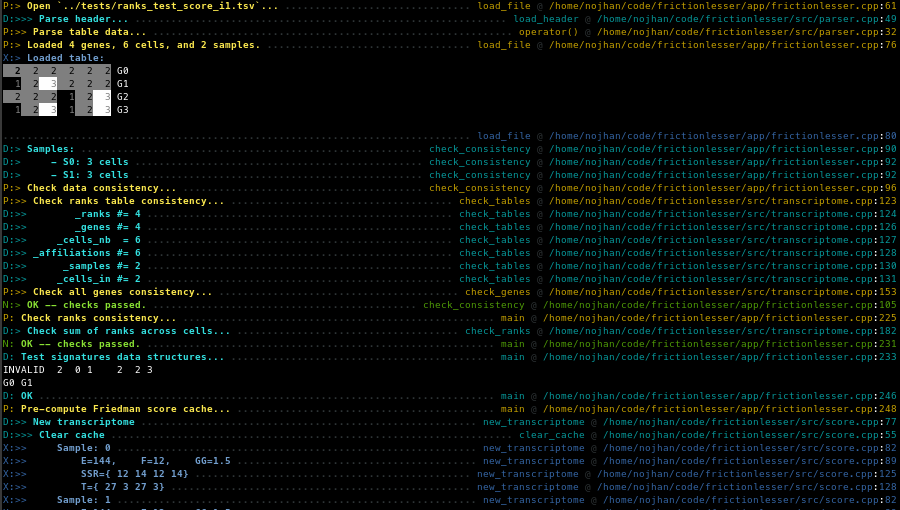
Example of a real-life log session (as seen in the [frictionlesser](https://github.com/jdreo/frictionlesser) software):
|
|
|
|
|
|
|
|
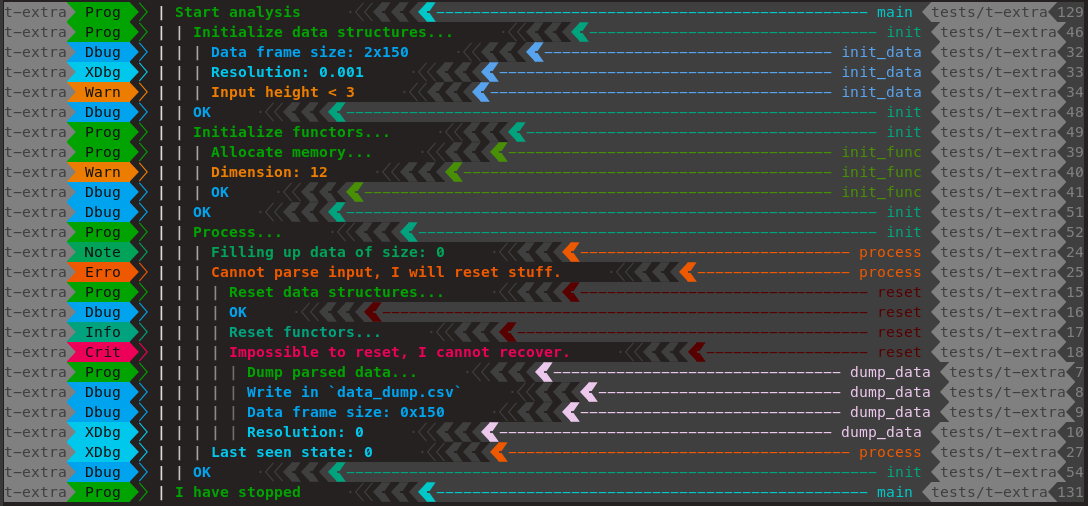
Demo showing fancy styling:
|
|
|
|
|
|
|
|
For more detailled examples, see the "Usage" sections below and the `tests` directory.
|
|
|
|
|
|
Rationale
|
|
---------
|
|
|
|
Most of existing logging systems targets service events storage, like fast queuing of transactions in a round-robin
|
|
database.
|
|
Their aim is to provide a simple interface to efficiently store messages somewhere, which is appropriated when you have
|
|
a well known service running and you want to be able to trace complex users interactions across its states.
|
|
|
|
Clutchlog, however, targets the *debugging* of a (typically single-run) program.
|
|
While you develop your software, it's common practice to output several detailled informations on the internal states
|
|
around the feature you are currently programming.
|
|
However, once the feature is up and running, those detailled informations are only useful if you encounter a bug
|
|
traversing this specific part.
|
|
|
|
While tracing a bug, it is tedious to uncomment old debugging code (and go on the build-test cycle)
|
|
or to set up a full debugger session that displays all appropriate data (with ad-hoc fancy hooks).
|
|
|
|
To solve this problem, Clutchlog allows to disengage *at runtime* your debug log messages in various parts of the program,
|
|
allowing for the fast tracking of a bug across the execution.
|
|
|
|
|
|
Basic Usage
|
|
===========
|
|
|
|
|
|
Calls
|
|
-----
|
|
|
|
The main entrypoint is the `CLUTCHLOG` macro, which takes the desired log level and message.
|
|
The message can be anything that can be output in an `ostringstream`.
|
|
```cpp
|
|
// Simple string:
|
|
CLUTCHLOG(info, "hello world");
|
|
|
|
// Serialisable variable:
|
|
double value = 0;
|
|
CLUTCHLOG(error, value);
|
|
|
|
// passed using inline output stream operators:
|
|
CLUTCHLOG(debug, "hello " << value << " world");
|
|
```
|
|
|
|
There is also a macro to dump the content of an iterable within a separate file: `CLUTCHDUMP`.
|
|
This function takes care of incrementing a numeric suffix in the file name,
|
|
if an existing file with this name exists.
|
|
```cpp
|
|
std::vector<int> v(10);
|
|
std::generate(v.begin(), v.end(), std::rand);
|
|
CLUTCHDUMP(debug, vec, "test_{n}.dat");
|
|
/* Will output in cat "rand_0.dat"
|
|
* # [t-dump] Info in main (at depth 5) @ /home/nojhan/code/clutchlog/tests/t-dump.cpp:22
|
|
* 1804289383
|
|
* 846930886
|
|
* 1681692777
|
|
*/
|
|
```
|
|
Note that if you pass a file name without the `{n}` tag, the file will be overwritten as is.
|
|
|
|
|
|
Log level semantics
|
|
-------------------
|
|
|
|
Log levels use a classical semantics for a human skilled in the art, in decreasing order of importance:
|
|
|
|
- *Critical*: an error that cannot be recovered. For instance, something which will make a server stop right here.
|
|
- *Error*: an error that invalidates a function, but may still be recovered. For example, a bad user input that will make a server reset its state, but not crash.
|
|
- *Warning*: something that is strange, but is probably legit. For example a default parameter is set because the user forgot to indicate its preference.
|
|
- *Progress*: the state at which computation currently is.
|
|
- *Note*: some state worth noting to understand what's going on.
|
|
- *Info*: any information that would help ensuring that everything is going well.
|
|
- *Debug*: data that would help debugging the program if there was a bug later on.
|
|
- *XDebug*: debugging information that would be heavy to read.
|
|
|
|
Note: the log levels constants are lower case (for example: `clutchlog::level::xdebug`), but their string representation is not (e.g. "XDebug", this should be taken into account when using `clutchlog::threshold` or `clutchlog::level_of`).
|
|
|
|
|
|
Location filtering
|
|
------------------
|
|
|
|
To configure the global behaviour of the logger, you must first get a reference on its (singleton) instance:
|
|
```cpp
|
|
auto& log = clutchlog::logger();
|
|
```
|
|
|
|
One can configure the location(s) at which messages should actually be logged:
|
|
```cpp
|
|
log.depth(3); // Depth of the call stack, defaults to the maximum possible value.
|
|
log.threshold(clutchlog::level::error); // Log level, defaults to error.
|
|
```
|
|
Current levels are defined in an enumeration as `clutchlog::level`:
|
|
```cpp
|
|
enum level {critical=0, error=1, warning=2, progress=3, note=4, info=5, debug=6, xdebug=7};
|
|
```
|
|
|
|
File, function and line filters are indicated using (ECMAScript) regular expressions:
|
|
```cpp
|
|
log.file(".*"); // File location, defaults to any.
|
|
log.func(".*"); // Function location, defaults to any.
|
|
log.line(".*"); // Line location, defaults to any.
|
|
```
|
|
A shortcut function can be used to filter all at once:
|
|
```cpp
|
|
log.location(file, func, line); // Defaults to any, second and last parameters being optional.
|
|
```
|
|
|
|
Strings may be used to set up the threshold:
|
|
```cpp
|
|
log.threshold("Error"); // You have to know the exact —case sensitive— string.
|
|
```
|
|
Note that the case of the log levels strings matters (see below).
|
|
|
|
|
|
Output Configuration
|
|
--------------------
|
|
|
|
The output stream can be configured using the `clutchlog::out` method:
|
|
```cpp
|
|
log.out(std::clog); // Defaults to clog.
|
|
```
|
|
|
|
The format of the messages can be defined with the `clutchlog::format` method, passing a string with standardized tags surrounded by `{}`:
|
|
```cpp
|
|
log.format("{msg}");
|
|
```
|
|
Available tags are:
|
|
|
|
- `{msg}`: the logged message,
|
|
- `{level}`: the current log level (i.e. `Critical`, `Error`, `Warning`, `Progress`, `Note`, `Info`, `Debug` or `XDebug`),
|
|
- `{level_letter}`: the first letter of the current log level,
|
|
- `{level_short}`: the current log level, printed in only four letters,
|
|
- `{file}`: the current file name,
|
|
- `{func}`: the current function,
|
|
- `{line}`: the current line number,
|
|
- `{level_fmt}`: the style of the current level (i.e. configured with `clutchlog::style`),
|
|
- `{filehash_fmt}`: a style for file names, which is value-dependant (see `clutchlog::filehash_styles`),
|
|
- `{funchash_fmt}`: a style for function names, which is value-dependant (see `clutchlog::funchash_styles`).
|
|
|
|
Some tags are only available on POSIX operating systems as of now:
|
|
- `{name}`: the name of the current binary,
|
|
- `{depth}`: the current depth of the call stack,
|
|
- `{depth_marks}`: as many chevrons `>` as there is calls in the stack,
|
|
- `{depth_fmt}`: a style depending on the current depth value (see `clutchlog::depth_styles`),
|
|
- `{hfill}`: Inserts a sequence of characters that will stretch to fill the space available
|
|
in the current terminal, between the rightmost and leftmost part of the log message.
|
|
|
|
|
|
### Log Format
|
|
|
|
The default log format is `"[{name}] {level_letter}:{depth_marks} {msg} {hfill} {func} @ {file}:{line}\n"`,
|
|
it can be overriden at compile time by defining the `CLUTCHLOG_DEFAULT_FORMAT` macro.
|
|
|
|
By default, and if `CLUTCHLOG_DEFAULT_FORMAT` is not defined,
|
|
clutchlog will not put the location-related tags in the message formats
|
|
(i.e. `{name}`, `{func}`, and `{line}`) when not in Debug builds.
|
|
|
|
|
|
Output Styling
|
|
--------------
|
|
|
|
Output lines can be styled differently depending on their content.
|
|
|
|
For example, output lines can be colored differently depending on the log level.
|
|
```cpp
|
|
// Print error messages in bold red:
|
|
log.style(level::error, // First, the log level.
|
|
fmt::fg::red, // Then the styles, in any order...
|
|
fmt::typo::bold);
|
|
```
|
|
|
|
Or, if you want to declare some semantics beforehand:
|
|
```cpp
|
|
// Print warning messages in bold magenta:
|
|
using fmt = clutchlog::fmt;
|
|
fmt warn(fmt::fg::magenta, fmt::typo::bold);
|
|
log.style(level::warning, warn);
|
|
```
|
|
|
|
Note: this inserts a style marker at the very beginning of the line.
|
|
If you add other styles later on the line, they will take precedence.
|
|
|
|
Colors can be specified in several different ways.
|
|
The ANSI color mode will be automatically detected,
|
|
depending on the types of arguments passed to styling functions:
|
|
- named tags from `clutchlog::fmt::fg` or `clutchlog::fmt::bg` will encode a 16-colors mode,
|
|
- integers will encode a 256-colors mode,
|
|
- numeric triplets or web hex strings will encode a 16 million ("true") colors mode,
|
|
- `clutchlog::fg::none` and `clutchlog::bg::none` can be passed in all modes.
|
|
|
|
For example, all the following lines encode
|
|
a bright red foreground for the critical level
|
|
(see the "Colors" section below):
|
|
```cpp
|
|
log.style(level:critical,
|
|
fmt::fg::red); // 16-colors mode.
|
|
log.style(level:critical,
|
|
255); // 256-colors mode.
|
|
log.style(level:critical,
|
|
255,0,0); // 16M-colors mode.
|
|
log.style(level:critical,
|
|
"#ff0000"); // 16M-colors mode again.
|
|
```
|
|
|
|
You may use styling within the format message template itself, to add even more colors:
|
|
```cpp
|
|
using fmt = clutchlog::fmt;
|
|
std::ostringstream format;
|
|
fmt discreet(fmt::fg::blue);
|
|
format << "{level}: "
|
|
<< discreet("{file}:") // Used as a function (inserts a reset at the end).
|
|
<< fmt(fmt::fg::yellow) << "{line}" // Used as a tag (no reset inserted).
|
|
<< fmt(fmt::typo::reset) << " {msg}" << std::endl; // This is a reset.
|
|
log.format(format.str());
|
|
```
|
|
Note: messages at the "critical", "error" and "warning" log levels are colored by default.
|
|
You may want to set their style to `none` if you want to stay in control of inserted colors in the format template.
|
|
|
|
The horizontal filling line (the `{hfill}` tag) can be configured separately with `clutchlog::hfill_style`,
|
|
for example:
|
|
```cpp
|
|
log.hfill_style(fmt::fg::black);
|
|
```
|
|
Note: this will actually reset any styling after the hfill,
|
|
disabling any style you would have set for the whole message using `clutchlog::format`
|
|
for the remaining of the message.
|
|
|
|
|
|
### Typographic Style
|
|
|
|
Available typographies:
|
|
|
|
- reset (remove any style),
|
|
- bold,
|
|
- underline,
|
|
- inverse,
|
|
- none.
|
|
|
|
Typographic styles are always passed with the named tag
|
|
(see `clutchlog::fmt::typo`), whatever the color mode.
|
|
|
|
|
|
### Colors
|
|
|
|
#### 16-colors mode
|
|
|
|
Using the `clutchlog::fmt` class, you can style:
|
|
|
|
- the foreground color, passing a `clutchlog::fmt::fg`,
|
|
- the background color, passing a `clutchlog::fmt::bg`.
|
|
|
|
In 16-colors mode, any of the arguments may be passed, in any order,
|
|
if an argument is omitted, it defaults to no color/style.
|
|
|
|
Available colors are:
|
|
|
|
- black,
|
|
- red,
|
|
- green,
|
|
- yellow,
|
|
- blue,
|
|
- magenta,
|
|
- cyan,
|
|
- white,
|
|
- bright_black,
|
|
- bright_red,
|
|
- bright_green,
|
|
- bright_yellow,
|
|
- bright_blue,
|
|
- bright_magenta,
|
|
- bright_cyan,
|
|
- bright_white,
|
|
- none.
|
|
|
|
Note: some terminals allow the user to configure the actual encoding of
|
|
those colors. You may thus notice some difference with the expected rendering
|
|
of the same colors encoded in the other modes. Use the other color modes if you
|
|
want to fully control the actual color rendering.
|
|
|
|
|
|
#### 256-colors mode
|
|
|
|
For 256-colors mode, colors are expected to be passed as integers in [-1,255]
|
|
or the `fg::none` and `bg::none` tags.
|
|
|
|
In 256-colors mode, if you want to only encode the background color,
|
|
you cannot just omit the foreground color,
|
|
you have to bass a `fg::none` tag as first argument.
|
|
|
|
```cpp
|
|
log.style(level::info, fg::none, 52); // No color over dark red.
|
|
log.style(level::info, fg::none, 52, typo::bold); // No color over bold dark red.
|
|
```
|
|
|
|
|
|
#### 16 million colors mode (RGB)
|
|
|
|
For 16M-colors mode, colors can be encoded as:
|
|
- three integer arguments,
|
|
- a "web color" hexadecimal triplet string, starting with a leading number sign (e.g. "#0055ff").
|
|
- the `fg::none` and `bg::none` tags.
|
|
|
|
In 16M-colors mode, if you want to only encode the background color,
|
|
you cannot just omit the foreground color,
|
|
you have to pass a `fg::none` tag as first argument.
|
|
|
|
```cpp
|
|
log.style(level::info, fg::none, 100,0,0); // No color over dark red.
|
|
log.style(level::info, fg::none, 100,0,0, typo::bold); // No color over bold dark red.
|
|
```
|
|
|
|
|
|
### Value-dependant Format Tags
|
|
|
|
Some tags can be used to change the style of (part of) the output line,
|
|
|
|
*depending on its content*.
|
|
The `{filehash_fmt}` and `{funchash_fmt}` will introduce a styling sequence
|
|
which depends on the current file name, and function name respectively.
|
|
The chosen style is chosen at random among the candidate ones,
|
|
but will always be the same for each value.
|
|
|
|
The set of candidate styles can be configured with `clutchlog::filehash_styles`
|
|
and `clutchlog::funchash_styles`, which both take a vector of `clutchlog::fmt`
|
|
objects as argument:
|
|
```cpp
|
|
// Either one or the other color for filenames:
|
|
log.filehash_styles( { fmt(fg::red), fmt(fg::yellow) } );
|
|
// This would fix the function name style to a single one:
|
|
log.funchash_styles( { fmt(typo::bold) } );
|
|
// Works with any `fmt` constructor
|
|
// (here, shades of blues in 256-colors mode):
|
|
log.funchash_styles( { fmt(33), fmt(27), fmt(39), fmt(45) } );
|
|
```
|
|
|
|
The same idea applies to `{depth_fmt}`.
|
|
However, if `clutchlog::depth_styles` is configured,
|
|
then the styles are chosen *in order*.
|
|
That is, a depth of 1 would lead to the first style being chosen.
|
|
If the current depth of the stack is larger than the number of configured
|
|
styles, then the last one is used.
|
|
For example:
|
|
```cpp
|
|
// Increasingly darker depth level colors (using the 256-colors mode).
|
|
log.depth_styles({ fmt(255), fmt(250), fmt(245), fmt(240), fmt(235) });
|
|
```
|
|
|
|
If `clutchlog::depth_styles` is set, the `{depth_marks}` template tag will render
|
|
with each mark having each own style corresponding to its depth.
|
|
Note: a depth of zero showing no mark, the first style in the list is never applied to marks.
|
|
|
|
|
|
Advanced Usage
|
|
==============
|
|
|
|
More Output Configuration
|
|
-------------------------
|
|
|
|
### Dump Format
|
|
|
|
The default format of the first line of comment added with the dump macro is
|
|
`"# [{name}] {level} in {func} (at depth {depth}) @ {file}:{line}"`.
|
|
It can be edited with the `format_comment` method.
|
|
If it is set to an empty string, then no comment line is added.
|
|
The default can be modified at compile time with `CLUTCHDUMP_DEFAULT_FORMAT`.
|
|
|
|
By default, the separator between items in the container is a new line.
|
|
To change this behaviour, you can change `CLUTCHDUMP_DEFAULT_SEP` or
|
|
call the low-level `dump` method.
|
|
|
|
By default, and if `CLUTCHDUMP_DEFAULT_FORMAT` is not defined,
|
|
clutchlog will not put the location-related tags in the message formats
|
|
(i.e. `{file}` and `{line}`) when not in Debug builds.
|
|
|
|
|
|
### Stack Depth Mark
|
|
|
|
The mark used with the `{depth_marks}` tag can be configured with the `clutchlog::depth_mark` method,
|
|
and its default with the `CLUTCHLOG_DEFAULT_DEPTH_MARK` macro:
|
|
```cpp
|
|
log.depth_mark(CLUTCHLOG_DEFAULT_DEPTH_MARK); // Defaults to ">".
|
|
```
|
|
|
|
### Horizontal Filling
|
|
|
|
The character used with the `{hfill}` tag can be configured wth the `clutchlog::hfill_mark` method,
|
|
and its default with the `CLUTCHLOG_DEFAULT_HFILL_MARK` macro:
|
|
```cpp
|
|
log.hfill_mark(CLUTCHLOG_DEFAULT_HFILL_MARK); // Defaults to '.'.
|
|
```
|
|
|
|
Clutchlog measures the width of the *standard error* channel.
|
|
If it is redirected, it may be measured as very large (or very small).
|
|
Thus, the `clutchlog::hfill_min` `clutchlog::hfill_max` accessors allow
|
|
to set a minimum and a maximum width (in number of characters).
|
|
```cpp
|
|
log.hfill_max(CLUTCHLOG_DEFAULT_HFILL_MAX); // Defaults to 300.
|
|
log.hfill_min(CLUTCHLOG_DEFAULT_HFILL_MIN); // Defaults to 150.
|
|
```
|
|
Note: clutchlog will use the measured width, unless
|
|
it goes out of `[clutchlog::hfill_min,clutchlog::hfill_max]`,
|
|
in which case it will be caped to those bounds.
|
|
|
|
|
|
### Stack Depth
|
|
|
|
By default, clutchlog removes 5 levels of the calls stack, so that your `main`
|
|
entrypoint corresponds to a depth of zero.
|
|
You can change this behaviour by defining the `CLUTCHLOG_STRIP_CALLS` macro,
|
|
or calling `clutchlog::strip_calls`.
|
|
```cpp
|
|
log.strip_calls(CLUTCHLOG_STRIP_CALLS); // Defaults to 5.
|
|
```
|
|
|
|
|
|
### Filename
|
|
|
|
By default, the `{file}` template tag is rendered as the absolute path
|
|
(which is usualy handy if your terminal detects paths
|
|
and allows to run a command on click).
|
|
|
|
You can change this behavior to display shorter names, using `clutchlog::filename`,
|
|
and passing one of the following the shortening method:
|
|
- `clutchlog::filename::base`: the file name itself,
|
|
- `clutchlog::filename::dir`: the name of the single last directory containing the file,
|
|
- `clutchlog::filename::dirbase`: the last directory and the file names,
|
|
- `clutchlog::filename::stem`: the file name without its extension,
|
|
- `clutchlog::filename::dirstem`: the last directory and the file without extension.
|
|
- `clutchlog::filename::path`: the absolute path (the default).
|
|
|
|
Example:
|
|
```cpp
|
|
log.filename(clutchlog::filename::path) // /home/nojhan/code/clutchlog/tests/t-filename.cpp
|
|
log.filename(clutchlog::filename::base) // t-filename.cpp
|
|
log.filename(clutchlog::filename::dir) // tests
|
|
log.filename(clutchlog::filename::dirbase) // tests/t-filename.cpp
|
|
log.filename(clutchlog::filename::stem) // t-filename
|
|
log.filename(clutchlog::filename::dirstem) // tests/t-filename
|
|
```
|
|
|
|
|
|
Disabled calls
|
|
--------------
|
|
|
|
By default, clutchlog is always enabled if the `NDEBUG` preprocessor variable is not defined
|
|
(this variable is set by CMake in build types that differs from `Debug`).
|
|
|
|
You can however force clutchlog to be enabled in any build type
|
|
by setting the `WITH_CLUTCHLOG` preprocessor variable.
|
|
|
|
When the `NDEBUG` preprocessor variable is set (e.g. in `Release` build),
|
|
clutchlog will do its best to allow the compiler to optimize out any calls
|
|
for log levels that are under `progress`.
|
|
|
|
You can change this behavior at compile time by setting the
|
|
`CLUTCHLOG_DEFAULT_DEPTH_BUILT_NODEBUG` preprocessor variable
|
|
to the desired maximum log level, for example:
|
|
```cpp
|
|
// Will always allow to log everything even in Release mode.
|
|
#define CLUTCHLOG_DEFAULT_DEPTH_BUILT_NODEBUG clutchlog::level::xdebug
|
|
```
|
|
|
|
Note that allowing a log level does not mean that it will actually output something.
|
|
If the configured log level at runtime is lower than the log level of the message,
|
|
it will still not be printed.
|
|
|
|
This behavior intend to remove as many conditional statements as possible
|
|
when not debugging, without having to use preprocessor guards around
|
|
calls to clutchlog, thus saving run time at no readability cost.
|
|
|
|
|
|
Low-level API
|
|
-------------
|
|
|
|
All configuration setters have a getters counterpart, with the same name but taking no parameter,
|
|
for example:
|
|
```cpp
|
|
std::string mark = log.depth_mark();
|
|
```
|
|
|
|
To control more precisely the logging, one can use the low-level `clutchlog::log` method:
|
|
```cpp
|
|
log.log(clutchlog::level::xdebug, "hello world", "main.cpp", "main", 122);
|
|
```
|
|
A helper macro can helps to fill in the location with the actual one, as seen by the compiler:
|
|
```cpp
|
|
log.log(clutchlog::level::xdebug, "hello world", CLUTCHLOC);
|
|
```
|
|
A similar `dump` method exists:
|
|
```cpp
|
|
log.dump(clutchlog::level::xdebug, cont.begin(), cont.end(), CLUTCHLOC, "dumped_{n}.dat", "\n");
|
|
log.dump(clutchlog::level::xdebug, cont.begin(), cont.end(), "main.cpp", "main", 122, "dumped.dat", "\n\n");
|
|
```
|
|
|
|
You can access the identifier of log levels with `clutchlog::level_of`:
|
|
```cpp
|
|
log.threshold( log.level_of("XDebug") ); // You have to know the exact string.
|
|
```
|
|
|
|
|
|
(De)clutch any function call
|
|
----------------------------
|
|
|
|
The `CLUTHFUNC` macro allows to wrap any function within the current logger.
|
|
|
|
For instance, this can be useful if you want to (de)clutch calls to `assert`s.
|
|
To do that, just declare your own macro:
|
|
```cpp
|
|
#define ASSERT(...) { CLUTCHFUNC(error, assert, __VA_ARGS__) }
|
|
```
|
|
Thus, any call like `ASSERT(x > 3);` will be declutchable
|
|
with the same configuration than a call to `CLUTCHLOG`.
|
|
|
|
|
|
(De)clutch any code section
|
|
---------------------------
|
|
|
|
The `CLUTCHCODE` macro allows to wrap any code within the current logger.
|
|
|
|
For instance:
|
|
```cpp
|
|
CLUTCHCODE(info,
|
|
std::clog << "We are clutched!\n";
|
|
);
|
|
```
|
|
|
|
|
|
Manually Increase Stack Depth
|
|
-----------------------------
|
|
|
|
You may want to manually increase the stack depth for a given logging call,
|
|
for instance to subdivise a single function in sections.
|
|
To do so, you can use the `CLUTCHLOGD` macro, which take an additional argument,
|
|
in the form of the number of additional (fake) stack depths you want:
|
|
```cpp
|
|
CLUTCHLOG( debug, "Call"); // Regular macro.
|
|
CLUTCHLOGD(debug, "Sub call", 1); // Adds an additional (fake) stack depth.
|
|
CLUTCHLOGD(debug, "Sub sub!", 2); // Adds two additional (fake) stack depths.
|
|
```
|
|
That way, the depth will be rendered to the actual depth, plus the additional
|
|
depth delta. Note that the displayed function will stay the same. Any filtering
|
|
on the stack depth will take into account the fake depth and not the real one.
|
|
|
|
|
|
Examples
|
|
========
|
|
|
|
Here what you would do to setup clutchlog with the default configuration:
|
|
```cpp
|
|
auto& log = clutchlog::logger();
|
|
log.out(std::clog);
|
|
// Location filtering.
|
|
log.depth(std::numeric_limits<size_t>::max());
|
|
log.threshold("Error");
|
|
log.file(".*");
|
|
log.func(".*");
|
|
log.line(".*");
|
|
// Colors of the 3 firsts levels.
|
|
log.style(clutchlog::level::critical, clutchlog::fmt(
|
|
clutchlog::fmt::fg::red,
|
|
clutchlog::fmt::typo::underline);
|
|
log.style(clutchlog::level::error, clutchlog::fmt(
|
|
clutchlog::fmt::fg::red,
|
|
clutchlog::fmt::typo::bold);
|
|
log.style(clutchlog::level::warning, clutchlog::fmt(
|
|
clutchlog::fmt::fg::magenta,
|
|
clutchlog::fmt::typo::bold);
|
|
// Assuming you are on a POSIX system.
|
|
log.format("[{name}] {level_letter}:{depth_marks} {msg} {hfill} {func} @ {file}:{line}\n");
|
|
log.depth_mark(">");
|
|
log.strip_calls(5);
|
|
log.hfill_char('.');
|
|
log.hfill_max(300);
|
|
log.hfill_style(clutchlog::fmt::fg::none);
|
|
```
|
|
|
|
And here are all the functions you may call to log something:
|
|
```cpp
|
|
// Basic message.
|
|
CLUTCHLOG(debug, "x = " << x);
|
|
|
|
// Any code section.
|
|
CLUTCHCODE(xdebug,
|
|
if(x < 0) std::cerr << "WTF?" << std::endl;
|
|
);
|
|
|
|
// Container to a file.
|
|
CLUTCHDUMP(note, my_vector, "my_vector.dat");
|
|
|
|
// Container to a numbered file.
|
|
CLUTCHDUMP(note, my_list, "my_list_{n}.dat");
|
|
|
|
// Function call.
|
|
CLUTCHFUNC(warning, my_check, x, y); // Calls: my_check(x,y);
|
|
|
|
// Declutchable asserts.
|
|
#define ASSERT(...) { CLUTCHFUNC(critical, assert, __VA_ARGS__) }
|
|
ASSERT(x>0);
|
|
```
|
|
|
|
Here what you would do to setup clutchlog with the default configuration
|
|
using 16M-colors mode:
|
|
```cpp
|
|
auto& log = clutchlog::logger();
|
|
log.out(std::clog);
|
|
// Location filtering.
|
|
log.depth(std::numeric_limits<size_t>::max());
|
|
log.threshold("Error");
|
|
log.file(".*");
|
|
log.func(".*");
|
|
log.line(".*");
|
|
// Colors of the 3 firsts levels.
|
|
log.style(clutchlog::level::critical, clutchlog::fmt(
|
|
"#ff0000",
|
|
clutchlog::fmt::typo::underline);
|
|
log.style(clutchlog::level::error, clutchlog::fmt(
|
|
"#ff0000",
|
|
clutchlog::fmt::typo::bold);
|
|
log.style(clutchlog::level::warning, clutchlog::fmt(
|
|
"#ff00ff",
|
|
clutchlog::fmt::typo::bold);
|
|
// Assuming you are on a POSIX system.
|
|
log.format("[{name}] {level_letter}:{depth_marks} {msg} {hfill} {func} @ {file}:{line}\n");
|
|
log.depth_mark(">");
|
|
log.strip_calls(5);
|
|
log.hfill_char('.');
|
|
log.hfill_max(300);
|
|
log.hfill_style(clutchlog::fmt::fg::none);
|
|
```
|
|
|
|
|
|
Limitations
|
|
===========
|
|
|
|
### System-dependent stack depth
|
|
|
|
Because access to the call stack depth and program name are system-dependent,
|
|
the features relying on the depth of the call stack and the display of the program name
|
|
are only available for operating systems having the following headers:
|
|
`execinfo.h`, `stdlib.h` and `libgen.h` (so far, tested with Linux).
|
|
|
|
Clutchlog sets the `CLUTCHLOG_HAVE_UNIX_SYSINFO` to 1 if the headers are
|
|
available, and to 0 if they are not.
|
|
You can make portable code using something like:
|
|
```cpp
|
|
#if CLUTCHLOG_HAVE_UNIX_SYSINFO == 1
|
|
log.depth( x );
|
|
#endif
|
|
```
|
|
|
|
|
|
### System-dependent horizontal fill
|
|
|
|
Because access to the current terminal width is system-dependent,
|
|
the `{hfill}` format tag feature is only available for operating systems having the following headers:
|
|
`sys/ioctl.h`, `stdio.h` and `unistd.h` (so far, tested with Linux).
|
|
|
|
Clutchlog sets the `CLUTCHLOG_HAVE_UNIX_SYSIOCTL` to 1 if the headers are
|
|
available, and to 0 if they are not.
|
|
You can make portable code using something like:
|
|
```cpp
|
|
#if CLUTCHLOG_HAVE_UNIX_SYSIOCTL == 1
|
|
log.hfill_mark( '_' );
|
|
#endif
|
|
```
|
|
|
|
If you use unicode characters in your template, the horizontal width will not be
|
|
computed properly, resulting in incorrectly right-aligned lines.
|
|
Solving this would require the use of third-party libraries, making portability
|
|
more difficult.
|
|
|
|
|
|
### Dependencies
|
|
|
|
Some colors/styles may not be supported by some exotic terminal emulators.
|
|
|
|
Clutchlog needs `C++-17` with the `filesystem` feature.
|
|
You may need to indicate `-std=c++17 -lstdc++fs` to some compilers.
|
|
|
|
|
|
### Variable names within the CLUTCHLOG macro
|
|
|
|
Calling the `CLUTCHLOG` macro with a message using a variable named `clutchlog__msg` will end in
|
|
an error.
|
|
|
|
|
|
### Features
|
|
|
|
What Clutchlog do not provide at the moment (but may in a near future):
|
|
|
|
- Super fast log writing.
|
|
- Thread safety.
|
|
|
|
What Clutchlog will most certainly never provide:
|
|
|
|
- Round-robin log managers.
|
|
- Duplicated messages management.
|
|
- External output systems (only allow output stream, you can still do the proxy yourself).
|
|
- External error handlers (not my job, come on).
|
|
- Automatic argument parser (please, use a dedicated lib).
|
|
- Signal handling (WTF would you do that, anyway?).
|
|
|
|
|
|
Build and tests
|
|
===============
|
|
|
|
To use clutchlog, just include its header in your code
|
|
and either ensure that the `NDEBUG` preprocessor variable is not set,
|
|
either define the `WITH_CLUTCHLOG` preprocessor variable.
|
|
|
|
If you're using CMake (or another modern build system),
|
|
it will unset `NDEBUG` —and thus enable clutchlog—
|
|
only for the "Debug" build type,
|
|
which is usually what you want if you use clutchlog, anyway.
|
|
|
|
To build and run the tests, just use a classical CMake workflow:
|
|
```sh
|
|
mkdir build
|
|
cd build
|
|
cmake -DCMAKE_BUILD_TYPE=Debug -DWITH_CLUTCHLOG=ON ..
|
|
make
|
|
ctest
|
|
```
|
|
|
|
There's a script that tests all the build types combinations: `./build_all.sh`.
|
|
|
|
|
|
Usage as a Git submodule
|
|
========================
|
|
|
|
If you are using Git and CMake, it is easy to include Clutchlog as a dependency.
|
|
|
|
First, add Clutchlog as a submodule of your repository:
|
|
```sh
|
|
git submodule add git@github.com:nojhan/clutchlog.git external/
|
|
git commit -m "Add clutchlog as a submodule dependency"
|
|
```
|
|
|
|
Then, in your `CMakeLists.txt` file, add:
|
|
```cmake
|
|
include_directories(external/clutchlog)
|
|
```
|
|
|
|
And that's it.
|