No description
| Filename | Latest commit message | Latest commit date |
|---|---|---|
| gitcrux_cheatsheet.svg | ||
| README.md | ||


The crux of Git
Git is:
- a backup system
- which targets source code
Git is not:
- a backup repository for large binary files
- homeomorphic endofunctors mapping submanifolds of a Hilbert space
Create a Git repository from scratch:
mkdir mysoft
cd mysoft
git init
git config user.name "Johann Dreo"
git config user.email johann.dreo@pasteur.fr
Basics
Commits
A Git repository is an history of incremental commits.
git log
echo "My soft" > README.md
git status
git add README.md
git commit
git status
git log
Canonic commit message format:
<type>[scope]: short title

Summary of changes.
With emphasis on the "why?".

[metadata]
Common types: fix, feat, docs, style, refactor, test.
See: https://www.conventionalcommits.org/en/v1.0.0/
Patches
echo "is awesome!" >> README.md
git status
git diff
git add README.md
git commit -v
git log
Branches
git checkout -b "fix/ortho"
vim README.md
git add README.md
git commit -v
gitk --all .
Merge
git checkout master
git merge fix/ortho
git log
gitk --all .
Remotes
Copy of the repository
Remote repository are backup of your local one
- elsewhere in your file system,
- on a server somewhere on the network (e.g. via https, ssh),
- hosted by services provider (e.g. github, gitlab)
cd ..
mkdir myremote
cd myremote
git clone ../mysoft
cd mysfot
gitk --all .
pull
You can get several commits at once from a remote repository with a pull:
cd ../../mysoft
echo "Check it out." >> README.md
cd ../myremote/mysoft
git pull ../../mysoft
Named remotes
You can give a name to a remote.
cd ../../mysoft
git remote add there ../myremote/mysoft
git pull there master
Remote Servers
If you own a privileged access to a remote on a server (e.g. gitolite on LAN, github or gitlab on internet, etc.), you can backup a set of commits with a push.
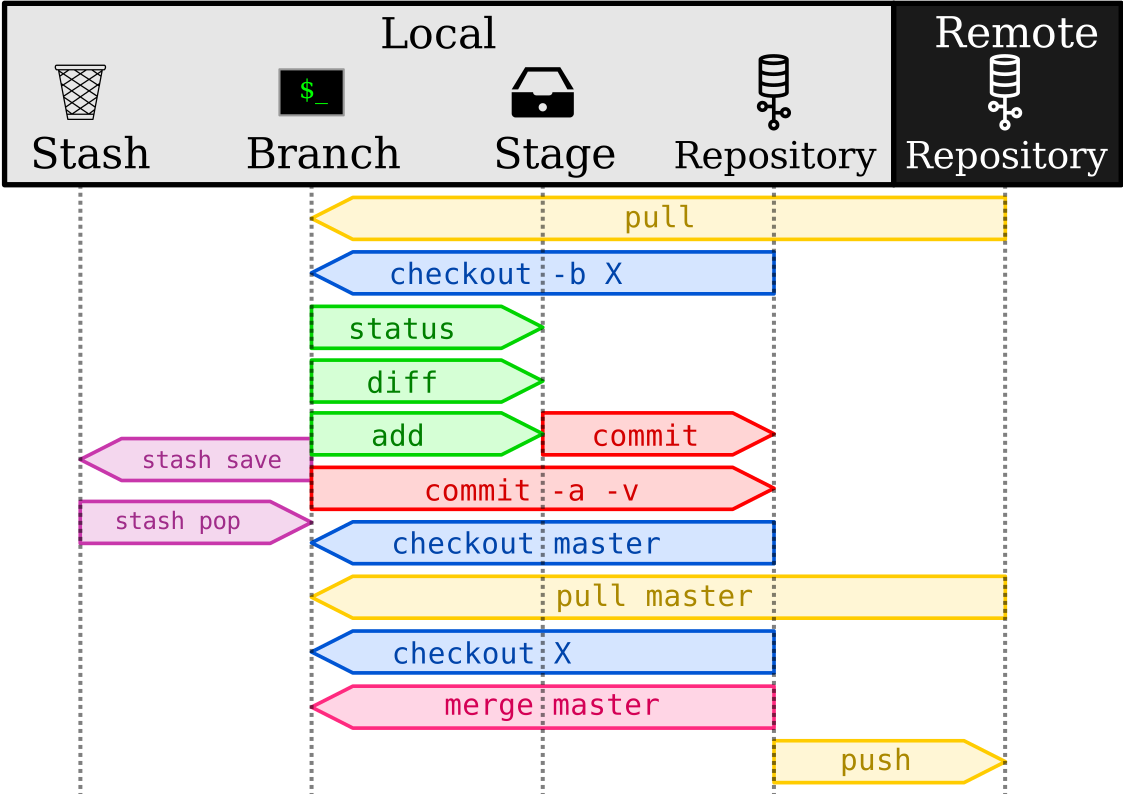
Workflow summary
Classical workflow for working with others:
0. pull
checkout -b feat/myfeat- Edit,
status,diff,commit -a -v,stash. pull origin mastercheckout mastermerge feat/myfeatpush- Pull request
- just send an e-mail, or
- send a patch, or
- on the issue tracker.
Nice Git features
- Automatic merge.
- Conflict detections.
- Faulty commit search (see
bisect).